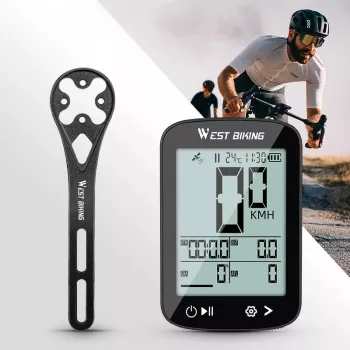
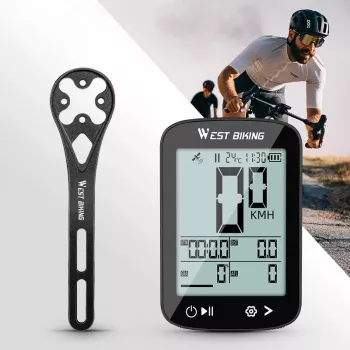
Whether you’re riding across town for an errand or heading out for a longer weekend trip, knowing your speed and distance can give the journey useful context. Our GPS Cycling Computer with Wireless Speed & Distance Tracking offers a straightforward way to keep those details in view, without turning every ride into a race.
We like ride information best when it supports the experience rather than takes over. Use it to get familiar with a commute, understand the length of a new route, or look back on a casual outing—and keep your attention on the road whenever you’re moving.
Speed gives you a reference for your riding pace, while distance tells you how far a trip takes you. Together, those two details can make a familiar route easier to understand. You might learn that a loop around your neighborhood is longer than expected, or get a better sense of how much ground you cover on a ride to the store.
For a commute, distance can help you become familiar with the trip between home and work. On a personal fitness ride, the same information can provide context for the time you spend on your bike. And on a relaxed outing, it can simply satisfy your curiosity about where the afternoon took you. None of those uses requires chasing a particular number or expecting a specific performance result.
Our GPS Cycling Computer with Wireless Speed & Distance Tracking brings speed and distance information to your ride in one device. It’s an option for riders who want those basic reference points for everyday trips as well as longer outings.
Numbers are most useful when you treat them as reference points, not targets that compete for your attention. A slower pace on one day doesn’t necessarily mean much by itself: a headwind, a hill, traffic signals, or a relaxed ride with friends can all change the experience.
If you’re curious about how a regular route feels over time, compare similar trips after you’ve stopped. Consider the conditions as well as the numbers. A route with several traffic lights may involve more stops than a quieter path of the same distance, and a windy day can feel different from a calm one. Give yourself room to enjoy those differences instead of trying to make every ride match the last.
The table below is a quick guide to putting the information in context:
| Ride information | Practical use | Keep in mind |
|---|---|---|
| Speed | Get a sense of riding pace | Road conditions and terrain affect pace |
| Distance | Understand how far a trip takes you | Choose routes that suit your available time |
| Speed and distance together | Build familiarity with regular routes | Prioritize safe riding over the numbers |
For example, you could use the distance from a regular errand to decide whether you have time to add a short detour on another day. Or you could note the distance of a weekend loop so you know what to expect when you ride it again. The goal is a better understanding of your trips, not a perfect reading every time.
Before installing the computer, read the supplied instructions and follow the recommended mounting steps. Position it where you can glance at it when safe without obstructing your view or interfering with steering. Make sure the setup is secure before setting off, and become familiar with the controls while you’re stationary.
Once you’re riding, keep looking ahead and remain aware of traffic, pedestrians, road surfaces, and changing conditions. Save a closer review of your ride information for a safe stop, and don’t try to operate the device in traffic. The National Highway Traffic Safety Administration’s bicycle safety guidance offers additional reminders for sharing the road.
A simple routine can make the information easier to use: prepare the computer before leaving, ride attentively, and look over your trip details once you’ve reached a safe place to stop. That approach leaves the numbers available when you want them without making them the focus of every moment.
Wireless speed and distance tracking can add useful context to a short errand, a daily commute, or a weekend loop. If you’d like those details available on your rides, explore the cycling computer listing. Its listed price is $41.51, subject to change.
For the rest of your day, our Diadora Men’s Green & White Leather Sneakers are another option to explore for casual, off-bike wear. Whatever your plans, our team encourages you to ride attentively and follow local road rules.
Speed gives you a reference for your riding pace, while distance shows how far your trip covers. Together, they can help you become familiar with a route.
Yes. You can use one to check the distance of a commute, understand a regular errand route, or get context for a casual ride.
Take only brief glances when it is safe to do so. Review the information more closely and operate the device while stopped in a safe place.

Leave a comment